
Banner Advertisements
Banner Advertisements (Beta)
The Delight VR Advertisement feature allows you to inject display banner ads into advertisement spots within the player’s HTML UI as well as the VR 3D UI of the player. This allows you to display your banners directly within VR. For the first iteration of the feature we support only a select number of spots to not overflow the VR space and player real-estate. The system was kept as extensible as possible and allows you to write a custom JavaScript binding between your ad-network and the player.
Supported Spots
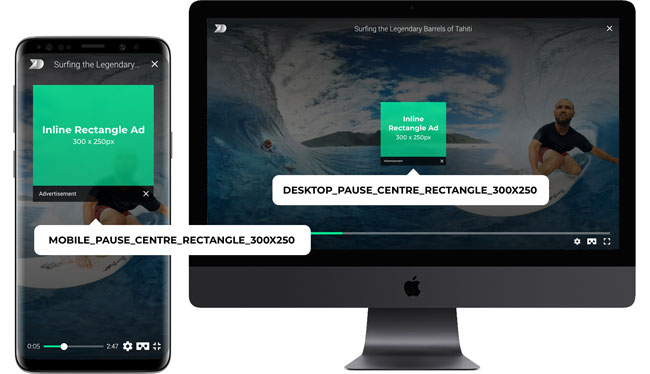
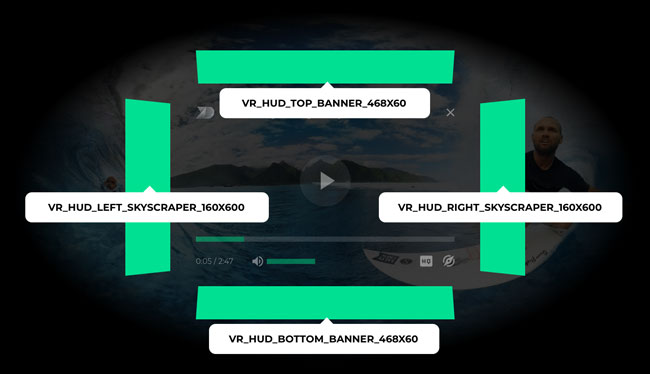
In the HTML portion of the player, only the pause spot is supported at 300x250px. In VR we support four banner placements, alongside the 3D UI (Player Controls). These banners always show when the controls are opened in VR; not only if the video is paused. Keep in mind that if you are using the Delight VR Recommendations feature, the VR_HUD_BOTTOM_BANNER_468X60 spot will be ignored.
HTML UI
- DESKTOP_PAUSE_CENTRE_RECTANGLE_300X250
- MOBILE_PAUSE_CENTRE_RECTANGLE_300X250
VR 3D UI
- VR_HUD_TOP_BANNER_468X60
- VR_HUD_BOTTOM_BANNER_468X60
- VR_HUD_LEFT_SKYSCRAPER_160X600
- VR_HUD_RIGHT_SKYSCRAPER_160X600
Implementation
To implement the feature on your deployment of Delight VR you have to write the declarative markup and a binding function in JavaScript that will get called each time an advertisement spot is possible to be displayed in the player.
HTML
Add the <dl8-advertisement> tag as a child of a <dl8-video> tag.
It requires the attribute on-request-advertisement to be present, which takes a function identifier as a value (see Javascript section for more information about the function implementation).
<dl8-video>
	...
	<dl8-advertisement on-request-advertisement="requestAdvertisement">
</dl8-video>
JavaScript
You can define a custom function which acts as a binding layer between the player and your ad provider. This function is called every time the player can display a certain advertisement spot. Information about the spot is passed in the requirement object, passed as a first parameter. Hints are provided in a second object, for contextualized information that could be used to make better decisions on the ad type that is ultimately requested and finally a callback is passed that needs to be called with the final data of what to display. Note that if you don’t want a certain spot to be filled you should call the callback function with null. Below you will find the details needed to implement each part:
Sample
function requestAdvertisement(requirement, hints, callback) {
   switch (requirement.spot) {
      case 'DESKTOP_PAUSE_CENTRE_RECTANGLE_300X250': {
         ...
         const advertisement = // Fetch your advertisement from ad network
         ...
         // or callback(null) when no ad should be displayed
         return callback({
            type: //advertisement type
            payload: {
               uri: //advertisement source uri
               adLink: // advertisement url link (only for type image)
            }
         })
      }
      ... // Other cases implementation
   }
}
requirement (object)
An object that provides information about what spot should be filled, please refer to it to provide a well defined callback object
Requirement object sample:
{
   spot: 'DESKTOP_PAUSE_CENTRE_RECTANGLE_300X250',
   type: ['image']
}
spot (String)
Spot identifier which can be used, for example, in a switch statement to fetch a different asset for this specific spot
type (Array)
Array of available types for the advertisement asset. Values can be image and/or iframe
hints (Object)
An object that provides hints about the state of the player. Useful for data manipulation upon certain conditions, before firing the callback function
hints = {
   screen: {
      width: Integer (px) // Player width,
      height: Integer (px) // Player height,
      fullscreen: Boolean,
      portrait: Boolean,
      vrActive: Boolean
   },
   device: {
      mobile: Boolean,
      tablet: Boolean,
      android: Boolean,
      ios: Boolean,
      ie: Boolean,
      vr: Boolean
   }
}
callback (Function)
A function that must be called with an object as the first parameter that adheres to the following structure:
{
   type: String,
   payload: {
      uri: String,
      adLink: String
   }
}
type (String)
Accepted values are “image” or “iframe”. In the case of VR spots the value “iframe” is not supported.
payload (Object)
- URI (String) The URI that is either the image URL or the iframe URL to be displayed as an advertisement.
- adLink (String) In case the type of the advertisement is “image” this is the target URI that should be navigated to if the user clicks on the advertisement banner.
